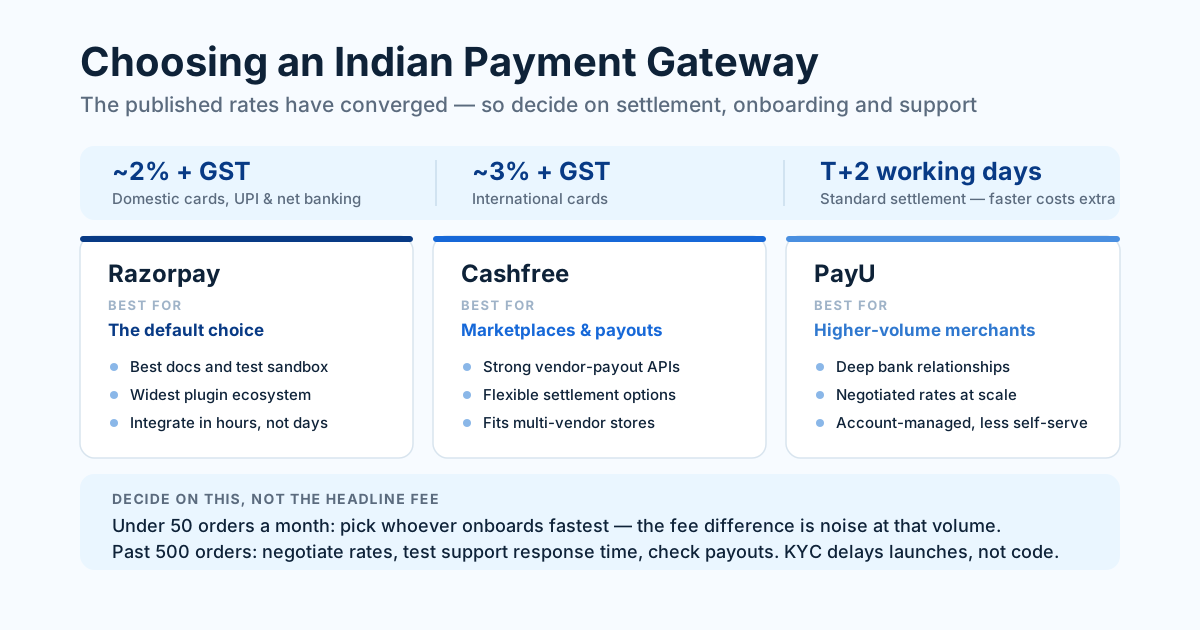
For most Indian online stores the honest answer is that Razorpay, PayU, and Cashfree all work, all cost roughly 2% plus GST, and the choice comes down to settlement speed, onboarding friction, and the quality of support when a payment fails at 11pm. The gateway is rarely what makes or breaks a store — but picking badly costs you weeks of migration later.
We've integrated all three across client stores, and the differences that matter in practice are almost never the ones listed on the pricing page. Here's what we've actually run into.
The short version
If you want the recommendation without the reasoning:
- Razorpay — the safe default. Best documentation, widest plugin support, largest ecosystem. Pick it if you want the least engineering friction and you don't have an unusual requirement.
- Cashfree — best if payouts matter. Strong settlement options and genuinely good vendor-payout tooling, so it suits marketplaces and anyone paying sellers or delivery partners.
- PayU — long-established with strong enterprise banking relationships. Often worth a conversation at higher volumes where negotiated rates and dedicated support beat developer experience.
Everything below is the detail behind those three sentences.
Pricing: almost identical, and that's the point
Headline pricing across the major Indian gateways has converged at roughly 2% + GST per domestic transaction, with no setup or annual fee on standard plans. International cards run closer to 3% + GST. UPI is usually cheaper or bundled, depending on the plan you're on.
Because the published rates are so close, comparing them is mostly wasted effort at small volumes. On 100 orders a month at ₹2,000 each, a 0.1% difference in rate is ₹200 a month. That is not a decision input. Choose on the things that actually differ.
Rates do become negotiable at scale. Once you're consistently above roughly ₹10 lakh a month in processed volume, every provider has a sales team willing to discuss custom pricing, and the difference between a negotiated 1.75% and a standard 2% starts being real money. Ask — the worst outcome is they say no.
What actually varies more than the percentage:
- Settlement speed. Standard is T+2 working days. Faster settlement is a paid add-on everywhere, usually a small percentage of the settled amount. If your cash flow depends on supplier payments, this is worth more than a few basis points on the transaction fee.
- Failed-payment handling. How the gateway retries, how clearly it reports a failure reason, and whether the customer sees something useful instead of a blank error screen.
- Refund timelines. How quickly a refund actually reaches the customer's account, and how much of that you can control versus explain.
At small volumes, gateway fees are a rounding error and settlement speed is a cash-flow decision. Choose for the second one.
Settlement: the number that hits your bank account
Settlement is when money actually arrives with you, and it's the part first-time sellers consistently underestimate. T+2 working days means a Friday sale can land the following Tuesday, and a long weekend pushes it further. Plan working capital around that, not around the order confirmation email.
Three practical notes:
- Your first settlement is usually slower. New merchants often sit on a longer hold while the provider watches for fraud and chargeback patterns. Expect up to a week for the first payout and don't promise a supplier otherwise.
- Instant settlement is real but priced. All three providers sell some form of same-day or T+1 settlement. It's a genuine product, not a trick, and for inventory-heavy businesses it usually pays for itself.
- Reconciliation is your job. The gateway settles in batches, not per order. The amount hitting your account is the batch total minus fees minus refunds, and matching that to individual orders is where accounting time disappears. If your store doesn't export a settlement report your accountant can read, you've bought yourself a monthly chore.
Onboarding and KYC: where launches actually slip
The most common cause of a delayed store launch in India isn't development. It's KYC.
Every gateway needs to verify you before allowing live transactions. Have these ready before you start, and the process takes two to five working days instead of two weeks:
- PAN — of the business, or yours if you're a sole proprietor
- Bank account proof — a cancelled cheque or bank statement, with the account name matching the business name exactly
- Business proof — GST certificate, Udyam registration, shop and establishment licence, or incorporation certificate
- Identity and address proof for the signatory
- A live website with visible Terms & Conditions, Privacy Policy, Refund/Cancellation Policy, Shipping Policy, and a real contact page
That last item catches almost everyone. Gateways will not approve a store with placeholder policy pages, and they do check. Write those pages properly before you apply — it's also a trust signal for customers, and a missing refund policy is one of the quieter reasons a site gets traffic but no orders.
Mismatched names are the other classic delay: if your bank account says "Kumar Traders" and your GST says "Kumar Trading Company", expect a rejection and a resubmission. Fix the mismatch first.
Integration: what it takes to build
From an engineering point of view, all three are similar: you create an order server-side, hand a payment session to the browser, and verify the signature on the callback. The parts that separate them are documentation quality and how the SDKs behave when something goes wrong.
Razorpay has the best developer experience of the three. The docs are clear, the test environment behaves like production, and there are maintained plugins for nearly every platform. On a standard build, integration is a few hours, not a sprint.
Cashfree is close behind and its payouts API is genuinely stronger — if you need to pay sellers, partners, or delivery staff programmatically, that's a real advantage rather than a marketing claim.
PayU works fine and has deep banking relationships, but its developer surface feels more enterprise: more configuration, more back-and-forth with an account manager, less "read the docs and ship it today".
Three things to get right regardless of provider, because they're where real money is lost:
- Verify the payment signature server-side. Never trust a client-side success callback to mark an order as paid. This is the single most common security mistake we find in existing stores, and it is exactly as exploitable as it sounds.
- Handle webhooks properly. Customers close the tab, lose signal mid-payment, or get stuck in a bank redirect. The webhook is the source of truth for what actually happened; the redirect is not.
- Get your GST invoice logic right. The tax split follows the delivery address, not the payment method, and getting this wrong surfaces at filing time rather than at checkout. We wrote up the rules in GST-compliant checkout.
If you're on Shopify or WooCommerce, all three have official plugins and this whole section collapses into installing one. That convenience is part of the broader platform-versus-custom trade-off worth thinking through before you commit.
How to actually decide
A decision rule that fits most Indian businesses:
- Under ~50 orders a month: pick whichever onboards you fastest. At this volume the fee difference is noise, and the real cost is the week you spend comparing. Razorpay is the reasonable default.
- 50–500 orders a month: settlement speed and support responsiveness start to matter. Ask each provider what their support response time actually is, and test it before you commit — send a pre-sales question and see how long the reply takes.
- 500+ orders a month: negotiate. Talk to all three, get quoted rates, and factor in payouts if you have vendors. This is where a 0.25% difference becomes worth a meeting.
- Marketplace or multi-vendor: look hardest at Cashfree, or plan for a split-settlement product from whoever you pick. Retrofitting vendor payouts later is painful.
- Selling internationally: check international card support and currency handling specifically. This is where the providers genuinely diverge, and where a wrong choice is most expensive to undo.
One last thing worth saying: don't over-engineer this. Every one of these providers processes billions of rupees a month reliably. The gateway will not be the reason your store succeeds or fails — your product pages, your load speed, and your trust signals will be. Pick a competent one, integrate it correctly, and spend the saved time on the parts of the store your customers actually see.
Want help putting this into practice? See our E-commerce Development service or get a free audit.