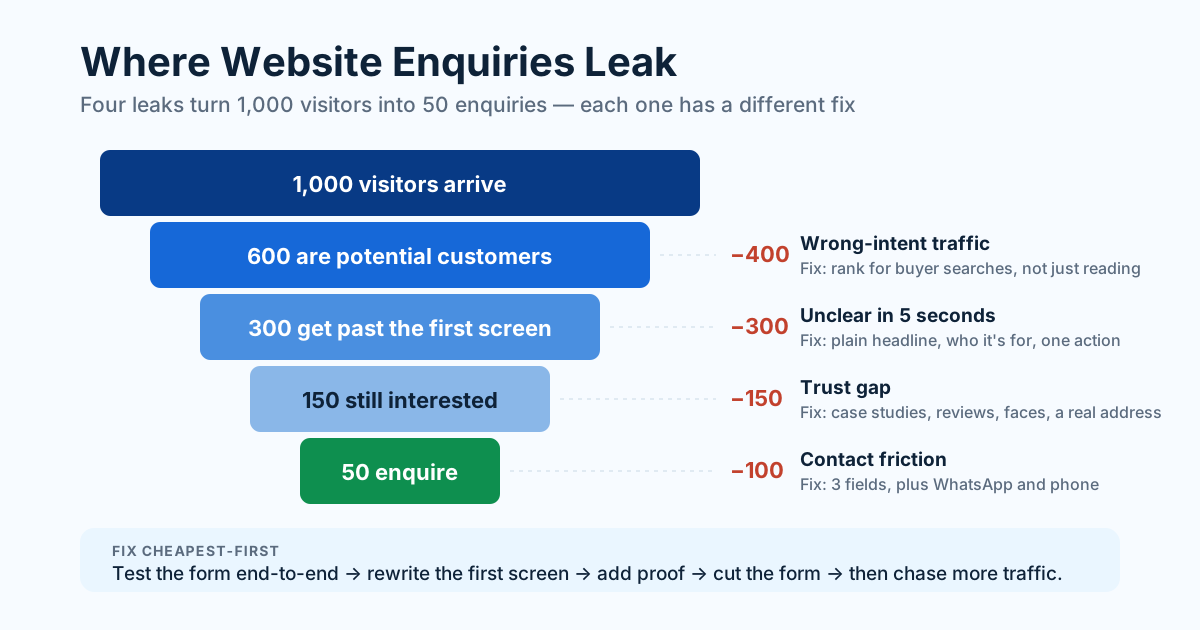
If your site gets visitors but no enquiries, the problem is almost never traffic volume. It's usually one of four leaks: the wrong visitors are arriving, the page doesn't answer their question fast enough, nothing establishes trust, or the contact step asks for too much.
This is one of the most common — and most fixable — complaints we hear. The site "works," analytics shows hundreds of sessions a month, and the enquiry inbox is silent. Below is how to find which leak you actually have, in the order that costs you the least to check.
First, check whether the traffic is even relevant
Before changing a single word on the page, look at what people searched for to reach you. This is where most silent websites lose the game.
Open Google Search Console and read the queries bringing in impressions and clicks. You're looking for one thing: does this person want to buy something, or are they just curious?
- "how to fix a leaking tap" — a reader. They will never enquire, and they shouldn't.
- "plumber in Kondapur" — a buyer. If these queries are absent, no amount of design work will produce enquiries.
A site ranking well for informational queries and poorly for commercial ones will show healthy traffic and empty inboxes forever. The fix isn't conversion tweaks; it's building pages that target the terms buyers actually type — service pages, location pages, and pricing pages. For local businesses this usually starts with local SEO fundamentals, because "near me" searches are where purchase intent lives.
Second, read your own first screen like a stranger
Assuming the traffic is right, the next leak is the top of the page. A visitor decides in a few seconds whether they're in the right place, and they decide using whatever is visible without scrolling.
Load your homepage on a phone and answer three questions using only what you can see:
- What does this business do? Not the tagline version — the plain version. "Marketing that moves the needle" tells a visitor nothing. "GST-compliant billing software for Indian pharmacies" tells them everything.
- Is it for someone like me? Industry, city, size, budget signal. Specificity is what makes a stranger self-identify as a customer.
- What do I do next? One obvious action, visible without scrolling.
If any answer requires scrolling or interpretation, that's your leak. The most common version of this mistake is a beautiful hero image with a vague slogan, followed by three paragraphs about the company's "journey." Visitors don't want your journey; they want to know whether you solve their problem.
Nobody bounces because your website is ugly. They bounce because in five seconds they couldn't tell whether you were for them.
Third, look for the trust gap
Plenty of visitors read the whole page, believe you can do the job, and still don't write in — because nothing on the page proves you're real. This is especially true for a first-time visitor arriving from a search result with no prior knowledge of your brand.
Trust is built by specifics, not adjectives:
- Named work. Real projects, real client names, real outcomes beat "trusted by many" every time. Even two or three genuine case studies change the temperature of a page.
- A human face and a real address. A team photo, a city, a landline or WhatsApp number. Anonymous sites read as risky.
- Reviews where they can be verified. A Google review count on the page, linked to the actual profile, outperforms unattributed testimonials in italic script.
- Clear pricing or at least a range. "Contact for pricing" makes a visitor assume it's expensive and that they'll be pursued by a salesperson. A stated starting price filters out the wrong enquiries and increases the right ones.
- Evidence you're active. A recent blog post, an updated portfolio, a current year in the footer. A site that looks abandoned gets treated as abandoned.
If your bounce rate is fine but enquiries are still missing, trust is usually the leak — people are reading, and then quietly opening a competitor's tab.
Fourth, count the friction in your contact step
The final leak is the mechanical one, and it's the easiest to fix. Go and fill in your own enquiry form on your phone, honestly, as a customer would.
Things that cost enquiries every day:
- Too many fields. Every field removed lifts completions. Name, contact, and a message is enough; you can ask the rest in the reply. Company size, budget dropdowns, and "how did you hear about us" belong in the conversation, not the gate.
- Only one way to get in touch. Some people want a form, some want WhatsApp, some want to call. Offer all three visibly, not buried on a contact page.
- A CTA that appears once. A long page needs the action repeated — after the services section, after the proof, at the end.
- Weak CTA wording. "Submit" and "Learn more" are dead phrases. "Get a fixed quote in 24 hours" tells someone exactly what happens next.
- No confirmation. If the form doesn't visibly say "we got it, here's when we'll reply," people assume it failed and leave.
- A form that's actually broken. More common than anyone expects — a mail setting changed, submissions land in spam, or the endpoint silently fails. If your enquiries stopped abruptly rather than gradually, test this first.
- A slow page. Speed is conversion, not just SEO; a hero that takes six seconds on 4G loses people before any of the above matters. Our Core Web Vitals guide covers what to measure.
Fixing it in the right order
Work cheapest-first, and change one thing at a time so you know what worked:
- Test the form end-to-end. Submit it from a phone, on mobile data. Confirm the email lands in the inbox, not spam.
- Rewrite the first screen. Plain description of what you do, who it's for, one clear action. This single change moves the number more often than any redesign.
- Add proof. Two case studies, a review count, a face, a city.
- Cut the form to three fields, add WhatsApp and phone.
- Repeat the CTA down the page with wording that states the outcome.
- Then look at traffic quality and start building pages for buyer-intent searches.
Give each change two to four weeks before judging it, and keep a note of what you changed and when — without that, you'll never know which fix earned the difference.
The number worth tracking
Stop watching sessions. Track enquiries per hundred visitors instead, month over month. It's the only figure that connects the website to the business, and it makes the trade-off obvious: going from one enquiry per hundred visitors to three is the same result as tripling your traffic, at a fraction of the cost and effort.
If you've been through this list and the page still isn't converting, the issue is usually structural — the page order, the hierarchy, and what a visitor is asked to understand before being asked to act. That's a UI/UX design problem rather than a copy problem, and it's worth diagnosing properly before spending another rupee sending traffic to a page that leaks.
Want help putting this into practice? See our UI/UX Design service or get a free audit.