A GST-compliant Indian store isn't about one tax setting — it's about capturing the right data at checkout so every order can produce a valid tax invoice: correct place of supply, optional buyer GSTIN, HSN codes, and the right split between IGST and CGST plus SGST.
Most store owners discover this the wrong way round: they launch, sell for a month, and then their CA asks for invoices the system was never built to produce. Fixing it retroactively is far more expensive than scoping it upfront. Here's what the checkout actually has to handle.
A note before we start: this is a practical guide to what your store's software needs to do, not tax advice. Rates, thresholds, and e-invoicing rules change, and they vary by what you sell — confirm the specifics with your CA before you go live.
What "GST-compliant checkout" really means
The checkout itself doesn't have compliance obligations. The tax invoice does. The checkout's job is to collect and store everything the invoice will need, because most of it can't be reconstructed afterwards.
That reframing matters, because it changes what you test. Don't ask "is the tax showing correctly on the cart page?" Ask "can this system generate a valid tax invoice for an intra-state B2C order, an inter-state B2B order, and a return?" If the answer is no for any of the three, you have work to do before launch.
The fields a valid tax invoice needs
A tax invoice for goods generally has to carry:
- Your details — legal name, address, and GSTIN
- Invoice number and date — sequential, unique within the financial year
- Buyer details — name, delivery address, and GSTIN where the buyer is registered
- Place of supply, especially for inter-state supplies
- HSN code and description for each item
- Quantity, unit, and taxable value per line
- Tax rate and amount, split into CGST and SGST or shown as IGST
- Total value, plus a signature or digital signature
Read that list against your current checkout. The two fields that are almost never captured by default are the buyer's GSTIN and per-product HSN codes — and both are painful to backfill across a live catalog and a month of past orders.
Place of supply: the bug almost every store ships
This is the single most common GST defect we find in Indian storefronts, and it's worth understanding properly.
For goods, the place of supply is broadly determined by where the goods are delivered. Two cases follow from that:
- Delivery state is the same as your registered state → intra-state supply → charge CGST + SGST
- Delivery state is different → inter-state supply → charge IGST
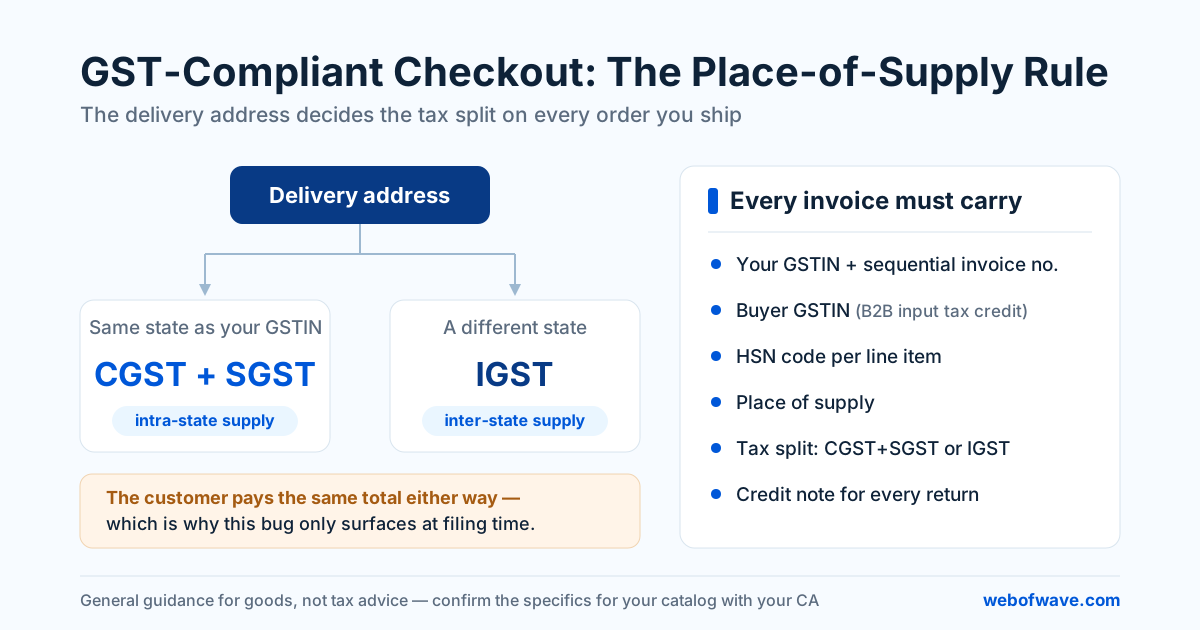
The total percentage the customer pays is usually the same either way, which is exactly why this bug survives testing. Nobody notices, because the cart total looks right. It only surfaces at filing time, when the returns don't reconcile and every affected invoice needs correcting.
Two implementation details worth getting right:
- The tax split must be driven by the delivery address, not the billing address or the account's default address. If a Mumbai customer ships to Bengaluru, the delivery state decides.
- The state has to be a structured field, not free text. "Karnataka", "KA", and "karnatka" cannot all be left for a human to reconcile later. Use a dropdown of states, and validate the PIN code against it.
Test your store by placing one order to your own state and one to a neighbouring state, then read both invoices. If the tax split doesn't change, your checkout has a compliance bug that won't surface until filing season.
B2B buyers and the GSTIN field
If any meaningful share of your customers are businesses, an optional GSTIN field at checkout is not a nice-to-have — it's a conversion feature.
A business buyer needs your invoice to carry their GSTIN in order to claim input tax credit. Without it, the GST they paid is a real cost to them, which quietly makes you more expensive than a competitor whose checkout captures it. Many B2B buyers will abandon a cart specifically over this.
What a well-built GSTIN field does:
- Marks itself clearly optional, so B2C customers aren't confused or slowed down
- Validates the format (15 characters, with the first two digits matching a state code) before accepting it
- Checks that the state code is consistent with the address, and warns when it isn't
- Optionally captures the registered legal name, which should appear on the invoice
- Stores the GSTIN on the order, not just on the customer profile — a customer may buy for different entities
Product-level tax rates and HSN codes
GST rates are not a single store-wide setting. Different products fall under different rates, and your catalog has to store the rate and HSN code per product, not per store.
This has a structural consequence: if your platform only supports a single tax rate, or a single tax class applied at the collection level, you'll hit a wall the moment you add a product taxed differently. Scope this against the catalog you plan to have in two years, not the one you're launching with.
The HSN digit requirement scales with turnover, so a small store and a larger one aren't held to the same detail. Ask your CA which applies to you, then store the code at the product level regardless — it's a field in the database either way, and adding it later means touching every SKU.
Shipping, COD fees, and discounts
Three details that quietly break invoices:
Shipping charges. When shipping is bundled with the goods being sold, it's generally treated as part of a composite supply and taxed at the rate of the principal item — not left untaxed and not taxed at some flat rate of its own. If your store has multiple tax rates in one cart, this needs deliberate logic rather than a default.
COD handling fees. These need to be treated consistently and appear as a proper line on the invoice, not as an unexplained difference between the cart total and the amount collected.
Discounts. A discount agreed at the time of supply and shown on the invoice generally reduces the taxable value. That means the discount has to appear on the invoice as a line, with tax computed on the reduced value — not applied silently to the final total after tax. Coupon logic that discounts the post-tax total produces invoices that don't add up.
Returns, refunds, and credit notes
A cancelled or returned order doesn't get its invoice deleted. It gets a credit note referencing the original invoice, with its own number and date, carrying the same tax split.
Design this in from the start, because it's the part every store forgets:
- Partial returns need line-level credit notes, not whole-invoice ones
- Credit notes need their own sequential numbering
- Refunding the payment and issuing the credit note are two separate actions, and both have to happen
- Someone in operations needs a screen where this is one click, not a spreadsheet exercise
If your store handles returns at any volume, this is usually the strongest argument for a custom admin panel over whatever the platform gives you by default.
What platforms actually give you
Honest summary of where the three common setups leave you:
| Out of the box | Usually needs work | |
|---|---|---|
| Shopify | Tax rates, basic invoices | Place-of-supply logic, GSTIN capture, HSN on invoices, credit notes — typically via an app |
| WooCommerce | Tax classes, plugin ecosystem | Same gaps, plus plugin maintenance and conflicts over time |
| Custom build | Nothing — you build it | All of it, but exactly to your rules, with no per-month app dependency |
None of these is disqualifying. The mistake is assuming any of them is compliant by default because the cart shows a GST line. For more on choosing between them, see our comparison of Shopify and a custom Next.js store.
Pre-launch checklist
Before you take real money, generate actual invoices for each of these and read them line by line:
- Intra-state B2C order — shows CGST + SGST
- Inter-state B2C order — shows IGST
- B2B order with GSTIN — buyer's GSTIN and legal name on the invoice
- Multi-rate cart — each line taxed correctly, shipping handled correctly
- Discounted order — discount reduces taxable value, totals reconcile
- Full cancellation — credit note generated, correctly numbered
- Partial return — line-level credit note, correct tax reversal
- Invoice numbering — sequential, no gaps, unique within the financial year
Then hand those eight invoices to your CA before launch, not after your first filing. An hour of their time now is worth considerably more than a month of corrections later.
If you're building or rebuilding a store and want this handled properly at the architecture level rather than patched afterwards, that's exactly the kind of thing we scope upfront in our e-commerce development work.
Want help putting this into practice? See our E-commerce Development service or get a free audit.