Choose Shopify when speed to market matters more than control; choose a custom Next.js store when your checkout, catalog, or performance needs have outgrown what a platform will let you change. Order volume is the usual tipping point.
That's the whole decision in two lines, but the reason it gets argued about so much is that both answers are correct — just for different businesses at different stages. Here's how to work out which one you are.
The 30-second version
If you recognise yourself in one of these, you probably already have your answer:
- Pick Shopify if you're launching a first store, have no in-house developer, sell a standard catalog with standard checkout, and want to be live in four to six weeks.
- Pick a custom Next.js build if you're already doing steady volume, your checkout has rules the platform fights you on, you have integrations that need real engineering, or page speed is materially costing you conversions.
- Stay where you are if the honest answer is "our current store is fine but our marketing isn't." Rebuilding a working store rarely fixes a traffic problem.
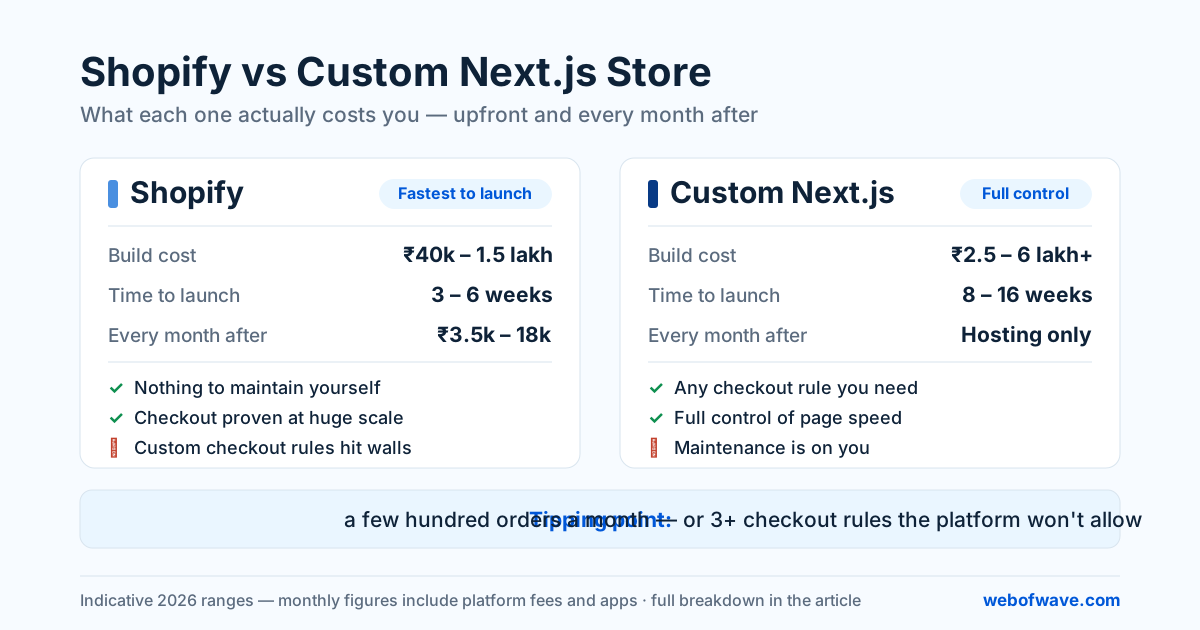
Everything below is just the detail behind those three.
What Shopify is genuinely better at
Shopify's real product isn't the storefront — it's everything you don't have to think about. Payments, PCI compliance, fraud screening, hosting, uptime, checkout that's been A/B tested across millions of carts, and an app ecosystem for almost any feature you can name.
That matters more than developers like to admit. A first-time store owner using Shopify gets a checkout flow refined by a company with more conversion data than any agency will ever see. You are not going to beat that from scratch on your first attempt.
It's also the lower-risk choice when your product is unproven. Every rupee spent on a custom build before you know what sells is a bet on a hypothesis. Shopify keeps that bet small — which is exactly why our advice for validating a new product is almost always "start there and don't overthink it."
Where Shopify starts to hurt
The trouble shows up in three predictable places:
- Checkout logic. Anything non-standard — partial COD with a prepaid discount, B2B pricing tiers, quantity-break rules, subscription and one-off in the same cart — runs into what the platform will and won't let you change. Some of it is possible on higher plans, some of it is possible with apps, and some of it simply isn't.
- App creep. Every added feature is another subscription and another script on your pages. Stores routinely arrive at ₹8,000–12,000 a month in apps, added one small subscription at a time, each one costing a little page speed on the way in.
- Performance ceilings. You control your theme, but not the platform's scripts, and not much of what the apps inject. There's a floor under how fast a heavily app-laden Shopify store can be, and past a point, tuning stops helping.
What a custom Next.js store is genuinely better at
A custom storefront's advantage is that nothing is off-limits. If a checkout rule makes sense for your business, it can be built. If a page needs to render in under a second on a 4G connection in a tier-3 city, you can control every byte that goes into it.
Three areas where that matters most:
- Performance and Core Web Vitals. You own the rendering strategy, the image pipeline, and the JavaScript budget. That's a direct conversion lever, not a vanity metric — and it's the single most common reason stores come to us for a rebuild. If you're not sure whether speed is actually costing you, the Core Web Vitals guide covers how to measure it before spending anything.
- Integrations that aren't off-the-shelf. ERP sync, Tally, custom shipping logic, a warehouse system, or an internal admin your operations team actually wants to use. Off-platform integrations are where custom builds earn their cost.
- SEO and content control. Full control over URL structure, rendering, structured data, and internal linking. This also matters increasingly for AI answer engines, which reward clean, well-structured, fast-loading pages.
Where custom builds hurt
Being honest about the other side: you now own everything. Security updates, uptime, payment integration maintenance, and the fact that when something breaks at 11pm during a sale, there's no support chat — there's your developer. A custom store without a maintenance arrangement is a liability with a countdown on it.
You also lose the app ecosystem. Features that were a ₹1,500/month subscription on Shopify are now a development ticket. Sometimes that's cheaper over three years. Sometimes it just means the feature never gets built.
The cost comparison, over three years
Sticker prices mislead here, because the two models spend money at different times.
| Shopify | Custom Next.js | |
|---|---|---|
| Build cost | ₹40,000 – 1.5 lakh | ₹2.5 – 6 lakh+ |
| Time to launch | 3 – 6 weeks | 8 – 16 weeks |
| Platform fee | ₹2,000 – 8,000/month | ₹0 |
| Apps / plugins | ₹1,500 – 10,000/month | Mostly built in |
| Hosting | Included | ₹0 – 5,000/month |
| Maintenance | Lower | Budget for it monthly |
| New feature | App, or not possible | Development ticket |
Run that over 36 months with your actual order volume and the gap narrows far more than most people expect — sometimes it inverts entirely. For a fuller breakdown of where the money goes, see what an e-commerce website really costs in India in 2026.
The right platform is the one that fits your third year of orders, not your first month of enthusiasm.
The five questions that actually decide it
When we scope a store, these are the questions that settle the argument faster than any feature comparison.
1. Does your checkout have rules a platform would fight you on? Write them down. If the list is empty, that's a strong vote for Shopify. If it has three or more real entries, custom starts making sense.
2. What's your monthly order volume? Below roughly a few hundred orders a month, platform fees are noise and Shopify wins on economics. Well above that, the monthly bleed becomes a real line item.
3. Who maintains it? If the answer is "nobody, really," pick the platform that maintains itself. This one question disqualifies more custom builds than budget ever does.
4. Is speed costing you money right now? Measure before you decide. If your store already loads fast enough and converts fine, performance is not your reason to rebuild.
5. How many integrations are on the list — including phase two? Count the ones you're planning for next year too. Integration count is the strongest single predictor of whether a store outgrows its platform.
The path most stores actually take
The best outcome usually isn't picking correctly on day one — it's picking cheaply on day one and moving deliberately when the numbers say so. Launch on Shopify, learn what actually sells, hit the platform's limits with real data in hand, then rebuild with a specification written from evidence rather than guesswork.
The only thing that makes this path expensive is a careless migration. Redirects, metadata, and structured data have to carry over one-to-one — that's the difference between a two-week ranking dip and a permanent one. Our guide on redesigning without losing SEO covers the checklist, and the same rules apply to a platform move.
What to do next
Answer the five questions above in writing. Most store owners find their answer somewhere in question one or question three, and the rest is confirmation.
If the answers point toward custom — or you're genuinely unsure — we scope e-commerce builds against a written list of catalog size, checkout rules, and integrations, and we'll say plainly when a platform is the better call. Turning down work we don't think you need is cheaper for everyone than building the wrong store twice.
Want help putting this into practice? See our E-commerce Development service or get a free audit.