If your new website isn't showing on Google, there are only four real possibilities: it's too new, something is blocking crawling, something is telling Google not to index it, or it's already indexed and you're checking the wrong way. Work through them in that order — the check takes ten minutes and usually saves you from paying someone to fix SEO that isn't broken.
We get this question more than any other, and it almost always arrives about two weeks after launch. The site looks great, the owner searches for their business, and there's nothing. In most of those cases the site is fine and needs patience. In roughly a third, there's a single line of code quietly keeping the whole thing out of the index.
First, confirm you're actually not indexed
Before diagnosing anything, check what Google already knows. Search this, replacing the domain with yours:
site:yourdomain.com
That shows every page Google has indexed for that domain. There are three possible outcomes, and they point in completely different directions:
- Nothing comes back. You're genuinely not indexed. Keep reading.
- The homepage appears, but few other pages do. You're partially indexed. The problem is discoverability or thin pages, not a block.
- Everything appears. You're indexed. Your problem is ranking, which is a different job entirely — covered further down.
That distinction matters more than anything else in this post. "Not on Google" and "not ranking on Google" get reported as the same complaint and need opposite responses. One is a technical block you clear in an afternoon. The other is months of content and authority work.
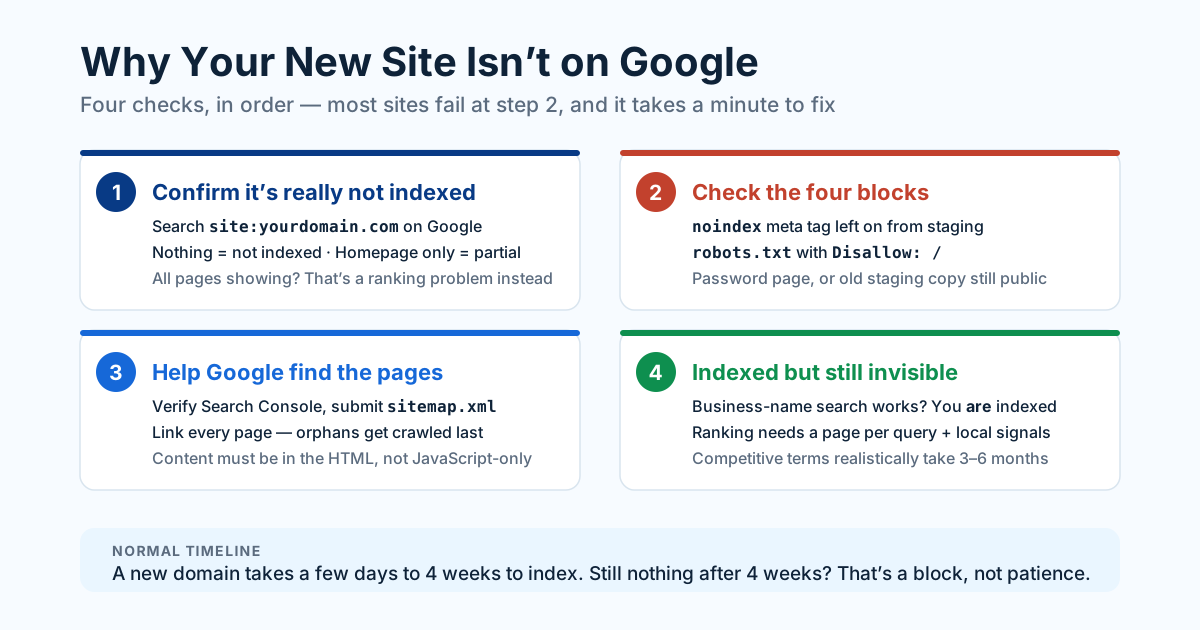
Second, check the four blocks that cause most cases
Almost every genuinely unindexed site we audit is blocked by one of four things, and all four are leftovers from development. Check them in this order — each takes about a minute.
1. A noindex tag left on from staging
This is the single most common cause. During development, sites carry a tag that tells search engines to stay away:
<meta name="robots" content="noindex, nofollow">
On launch day, someone forgets to remove it. The site is live, fast, beautiful, and invisible. To check, open your homepage, view the page source (Ctrl+U), and search for noindex. On WordPress the same setting hides behind Settings → Reading → "Discourage search engines from indexing this site" — a single checkbox that has probably cost Indian businesses more traffic than any algorithm update.
2. robots.txt disallowing everything
Visit yourdomain.com/robots.txt. If you see this, crawlers are being told to leave:
User-agent: *
Disallow: /
That one slash blocks the entire site. It belongs on staging and nowhere else. Note the difference from the tag above: robots.txt blocks crawling, noindex blocks indexing. A page blocked in robots.txt can still surface as a bare URL with no description, which is its own kind of embarrassing.
3. Password protection or a leftover holding page
Some hosts keep a "coming soon" plugin or HTTP basic auth switched on after launch. Google sees a login prompt instead of your content. Test it honestly: open the site in a private window, logged out, on mobile data rather than office Wi-Fi. What loads there is roughly what Google sees.
4. The staging site is still live
If staging.yourdomain.com or the developer's temporary URL is still publicly reachable and indexable, Google may have indexed that copy first and then treated your real site as the duplicate. Take the staging environment down, or put it behind a password, the day you go live.
Most "we're not on Google" emergencies turn out to be one line of staging code that nobody removed on launch day. Check that before you buy anything.
Third, make sure Google can find and read your pages
If nothing is blocking you, the next question is discoverability. Google has to find pages before it can index them, and a brand-new domain has no backlinks pointing at it — so nothing naturally leads a crawler to your door.
Set up Google Search Console. Free, fifteen minutes, non-negotiable. Verify the property, submit your sitemap (usually yourdomain.com/sitemap.xml), then run URL Inspection on your homepage and click Request Indexing. Search Console is also the only place that tells you why a page isn't indexed. "Discovered – currently not indexed", "Crawled – currently not indexed", and "Excluded by 'noindex' tag" are three different diagnoses with three different fixes, and guessing between them wastes weeks.
Check that every page is internally linked. A page nothing links to is an orphan, and orphans get found last, if at all. Your navigation, footer, and body copy should leave a click path from the homepage to every page you care about.
Check that your content exists in the HTML. Some JavaScript-heavy builds render text only after scripts run. Google can execute JavaScript, but it's slower, queued, and less reliable than reading plain HTML. Right-click → View Page Source — the actual source, not Inspect Element — and look for your real headings and body copy. If the source is nearly empty, fix that. It's on our technical SEO checklist for a reason, and it also decides whether AI answer engines can read you at all.
Then give it time. For a new domain with no links, two to four weeks is normal. Requesting indexing on your five most important pages speeds that up noticeably. Publishing something genuinely useful and earning one or two real links — a local directory, a supplier's partner page, your own verified profiles — speeds it up further.
If you're indexed but still invisible
This is where most sites actually are, and it deserves saying plainly: being indexed is the starting line, not the finish.
Search your exact business name. If you appear, Google knows you exist. What you're really asking is why you don't appear for "web design company in Hyderabad", or whatever your money term is. That's a ranking question — and for every commercial term there are sites that have been building relevance for it for years.
Three things move it, in rough order of impact for a new site:
- Pages that actually target the query. You will not rank for "e-commerce developer in Pune" with a homepage and an About page. You need a page whose entire job is that topic, with the phrase in the title, the H1, and the copy — written for a human, not stuffed for a crawler.
- Local signals, if you serve a city. A complete Google Business Profile, consistent name, address and phone across the web, and real reviews decide the map pack, which sits above the blue links. The mechanics are in local SEO for Indian businesses.
- Time and evidence. New domains are treated cautiously. Three to six months of consistent publishing plus a handful of genuine links is the realistic timeline before competitive terms start to move.
The uncomfortable part: nobody can make a two-week-old site rank for a competitive commercial term. Anyone promising that is selling you paid ads under a different name, or nothing at all.
The ten-minute diagnostic
Run these in order and stop at the first failure:
site:yourdomain.comon Google — indexed or not?- View source on the homepage — any
noindex? - Open
/robots.txt— anyDisallow: /? - Open the site in a private window — does it load without a password?
- Search Console → URL Inspection on the homepage — what reason does it give?
- Search your exact business name — do you appear?
- If yes to 6, you have a ranking problem, not an indexing problem.
Six of those seven checks are free and need nobody's help. If you clear all of them and pages are still missing after four weeks, the cause is usually deeper: wrong server response codes, canonical tags pointing at the wrong URL, or a migration that left redirects broken. That's the point to bring in someone who can read a crawl report — and it's the same ground we cover when a redesign quietly loses rankings.
Either way, start with the ten minutes. It's remarkable how often the answer is a checkbox.
Want help putting this into practice? See our SEO & Technical SEO service or get a free audit.