A typical business website takes 2–4 weeks, an e-commerce store 4–8 weeks, and a custom web application 3 months or more. But the honest answer is that the calendar is set less by the code and more by content, decisions, and feedback speed.
Anyone who's been through a website project knows the pattern: the timeline the developer quoted was fine, and the project still ran late. This post breaks down what actually takes how long, where the time really goes, and how to be the kind of client whose project finishes on schedule.
Typical timelines by project type
Here's what we quote, and what those numbers assume:
- Landing page or one-pager: 3 days – 1 week. Design, build, connect the form, launch. The assumption: copy and images exist before we start.
- Business website (5–10 pages): 2–4 weeks. Design direction, page builds, contact forms, basic SEO setup, launch. The classic brochure-plus site for a clinic, firm, or studio.
- E-commerce store: 4–8 weeks. Everything above, plus catalog setup, payments, shipping rules, and testing checkout until it's boring. Timelines here scale with catalog size and integrations more than page count.
- Custom web application: 3–6 months, sometimes more. Admin panels, dashboards, booking systems, anything with user accounts and business logic. These are software projects that happen to live in a browser, and they follow software timelines.
- Redesign of an existing site: add 1–2 weeks to the comparable tier — migration, redirects, and making sure you don't lose your SEO rankings in the move all take deliberate care.
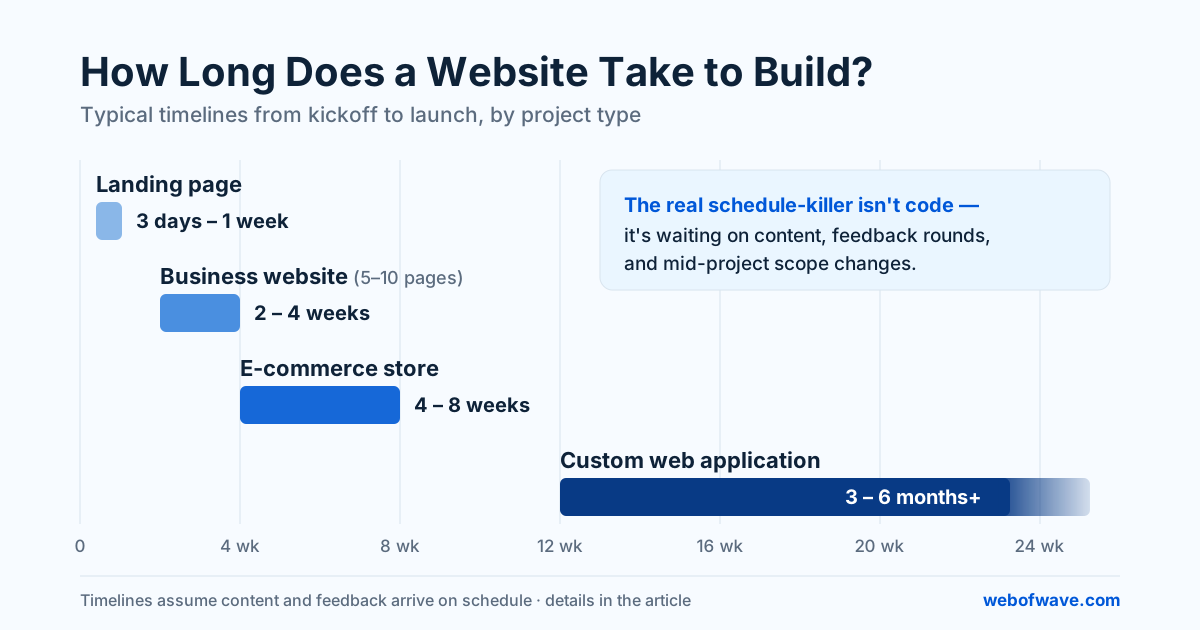
Treat these as honest midpoints, not guarantees. A 6-page site with finished content genuinely ships in two weeks. The same site waiting on photography and three rounds of stakeholder feedback takes two months, and no developer can code their way around that.
Where the time actually goes
The surprise for most first-time clients is how the hours are distributed. On a typical business site, the split looks roughly like this:
- Discovery and planning (10–15%). Understanding the business, mapping pages, agreeing what the site needs to do. Skipping this doesn't save time — it just moves the confusion to the middle of the project, where it's more expensive.
- Design (25–30%). Direction, then page designs, then revisions. Revision rounds are the elastic part: two focused rounds keep things on schedule, six vague ones don't.
- Development (30–35%). The part everyone thinks of as "building the website" — and it's usually the most predictable phase, because it's the one thing fully inside the builder's control.
- Content loading and review (15–20%). Real text and images going in, and the layout adjustments that follow, because real content never behaves quite like placeholder content.
- Testing and launch (10%). Cross-device checks, forms, speed, redirects, DNS. Rushed most often, and the phase you'll regret rushing — a launch-day check that takes an afternoon prevents the kind of problems that take weeks to notice and fix. (Speed especially: see our Core Web Vitals guide for what gets checked and why.)
The real schedule-killer: waiting
Ask any web studio what delays projects and you'll get the same answer, delivered with a tired smile: waiting for content.
The site is designed, the pages are built, and everything sits for three weeks because the About page text isn't written and the product photos haven't been taken. Then feedback trickles in one stakeholder at a time, each round reopening something the previous round closed.
None of this makes clients bad people — everyone's running a business, and writing your own About page is genuinely hard. But it does mean the timeline is a shared responsibility, and the fastest projects are the ones where both sides treat it that way.
Website timelines aren't set by how fast developers code. They're set by how fast decisions get made and content gets delivered.
How to keep your project on schedule
A few habits separate the projects that launch on time from the ones that drift:
- Get content moving before the build starts. Text and images can be drafted while design is in progress. If writing is the bottleneck, say so early — content help can be part of the project instead of the thing that stalls it.
- Name one decision-maker. Feedback from five people, filtered through one voice. Committee feedback delivered raw is the second-biggest delay after missing content.
- Batch your feedback. One consolidated list per review round beats fifteen WhatsApp messages across a week — and it gets your changes turned around faster too.
- Freeze the scope, park the ideas. New ideas mid-project are normal and often good. Put them in a phase-2 list instead of wedging them into the current build. The site can evolve after launch; that's rather the point of the web.
- Ask for a schedule with dates on both sides. A good proposal shows not just when the studio delivers, but when they need things from you. If your side of the dates looks unrealistic, better to find out at kickoff.
When "fast" should worry you
One caveat from the other direction: if a quote promises a full custom site in three days, ask what's being skipped. Usually it's discovery, testing, or both — or the "custom" site is a template with your logo dropped in. Templates are a perfectly valid choice when chosen deliberately; they're a problem when you're paying custom prices for one.
Speed is a feature of good process, not a substitute for it. A two-week build by a team with a tight process beats a two-month build by a team improvising — and it also beats a three-day build by a team cutting corners you won't discover until the contact form silently fails during your first ad campaign.
If you're planning a project and want a timeline scoped against your actual content readiness and scope — not a generic promise — that's exactly the conversation a good website development kickoff should start with.
Want help putting this into practice? See our Website Development service or get a free audit.